Player Guide
Overview
In Simple Survey, students are asked to complete a linear survey or questionnaire. Questions can be answered in any order, but students must respond to all questions to complete the widget.
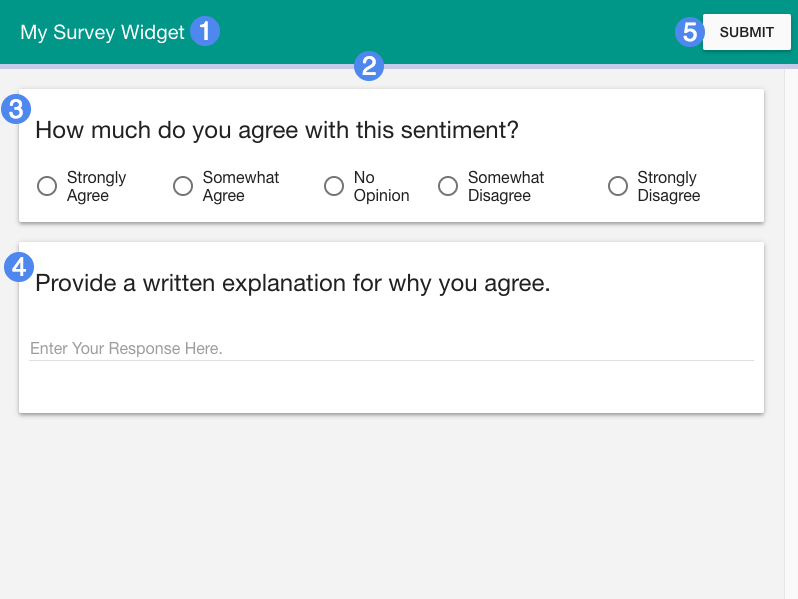
- Title of widget
- Completion bar
- Survey question (multiple choice)
- Survey question (free response)
- Submit button
Details
Survey questions come in one of four types: multiple choice, check-all-that-apply, free response, and ranked choice.
- For Multiple Choice questions students are asked to select one out of a range of answer options.
- For Check All That Apply questions, students are asked to select one or more answer options.
- For Free Response questions, students can provide a phrase, sentence, or paragraph in response to the question prompt.
- For Ranked Choice or "sequence" questions, students are asked to rank a set of answer choices in preferential order.
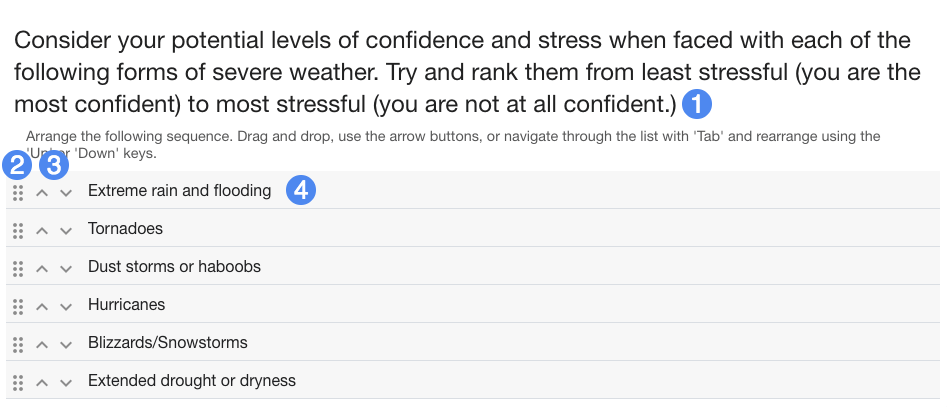
- Ranked choice question text
- Drag handle to rearrange answer item
- Arrows to rearrange answer item
- Answer item
In addition to dragging answer choices or using the arrows (3), students can also use the tab key in addition to the up and down arrow keys to rearrange the answer choices.